


Google Chat
4.426.04K Reviews
App Specs
- Version
- Varies with Device
- Updated On
- License
- Free
- Downloads
- 50,000,000+
- Developer
- Google LLC
- Categories
- Business
- Platform
- Android, iOS
Screenshots


 Analysis by AppCompare
I find Google Chat most useful when a conversation needs to stay tied to work rather than disappear into a mix of personal messages. It is a business communication app from Google LLC, and its appeal is clearest for people who already use a Google account to coordinate projects. The service has an average rating of 4.4 from around 325,000 ratings, and it has passed 50 million installs. Those figures suggest a familiar, widely used option, but the more important question is whether its way of organizing conversations suits your day.
How it feels in everyday work
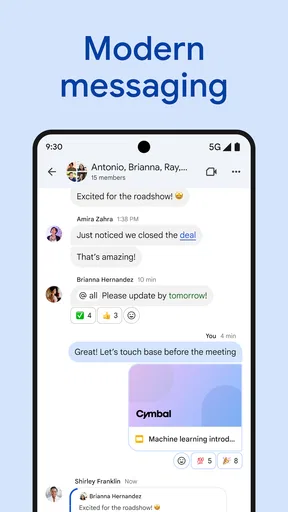
My first impression is that the app aims to make work conversations feel orderly without asking you to learn a complicated system. You can use direct messages for one-to-one exchanges and group spaces for ongoing projects, so a quick question does not have to share the same thread as a team-wide discussion. That distinction is useful when several people are coordinating different tasks at once.
The interface is generally easy to approach, especially if you already recognize Google’s account and collaboration environment. I would not describe that familiarity as a substitute for a proper team workflow, though: people still need to agree where decisions belong and how to name or use spaces. Without those habits, even a tidy messaging app can become a pile of conversations that is hard to search mentally.
Speed expectations and the feel of the app
For routine exchanges, I would expect a messaging tool like this to feel most responsive when the conversation is simple: opening a chat, reading recent messages, or sending a short reply. That is a practical expectation, not a promise of a particular loading time. Network quality, the phone itself, and the size of a conversation can all affect how quickly an app feels in the moment.
Rather than treating Chat as a place to write every long project document, I find it more sensible to use it for coordination and handoffs. A concise message with a clear next step is easier to follow than a sprawling discussion that tries to replace a document. When the details matter, keep the fuller material in the appropriate shared file and use the conversation to point colleagues toward it.
When conversations get busy
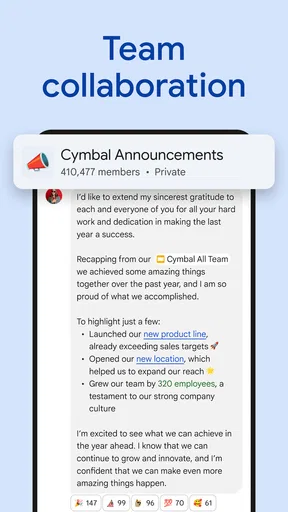
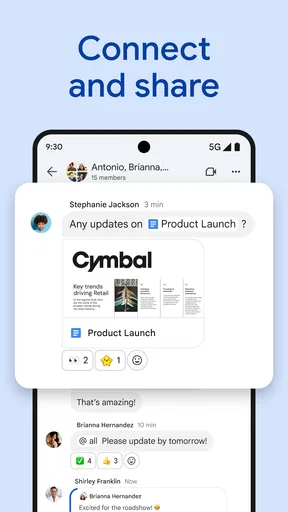
Group work is where the difference between a message stream and a useful workspace becomes noticeable. A room for a specific project gives the team a common place to return to, while a direct message can handle a narrow question that does not concern everyone. Threaded replies can also help keep a side discussion attached to the original point instead of letting it interrupt every other update.
One practical habit is to make the first message in a project space explain its purpose and the kind of updates that belong there. That small bit of context can reduce repeated questions later. If a decision is made in a thread, I would also restate the result plainly in the main conversation when the whole group needs to act on it; a useful detail is only useful if the right people can find it.
Worth Reading Before You Choose

Baby Panda World Brings Quick Play to Modern Phones, but Its Game Library Feels Busy

ESPN’s Live Game View Makes Following Close Games Easier

QuizzLand Review: A Good Fit for Short Trivia Breaks, Not Every Player

Basketball Stars: Multiplayer Is Fast, but Can It Recover When Matches Go Wrong?

WEBTOON Turns Phone Updates Into a Better Reading Routine

Link to Windows Runs on Shared Habits, Not Social Feeds
For example, imagine a small team preparing a presentation. One person can ask a quick scheduling question in a direct message, while the group space holds the draft link, feedback, and the final assignment of tasks. If comments start branching into unrelated subjects, threads provide a way to keep the original topic legible. The benefit is not that every project becomes effortless, but that people have a clearer place to look before asking the same question again.
Reliability, context, and recovery
For work communication, reliability is partly technical and partly social. A message can be delivered successfully and still be missed if a teammate is not checking the right conversation. I would treat Chat as a shared coordination channel, not as a guarantee that every urgent request will be seen immediately. For time-sensitive matters, agree on an appropriate response habit with your team instead of assuming that a notification alone settles the issue.
Conversation organization can make it easier to recover context after stepping away. Returning to a project space and reading the relevant thread is often more manageable than scrolling through a group chat where every topic is mixed together. The trade-off is that people need to use threads consistently. If some replies branch off and others appear as fresh messages, the history can still feel scattered.
It also helps to write messages so they remain understandable later: name the task, mention who needs to act, and include the relevant file or reference in the conversation. That is a simple, non-obvious improvement for teams that revisit discussions after a day or two. Short messages are convenient in the moment; messages with enough context are much more useful when someone has to catch up.
Device constraints and practical fit
Because this is a mobile app, it is convenient for checking a work conversation away from a desk, but a phone is not always the best place to manage a complicated project discussion. Small screens make long exchanges harder to scan, and composing a detailed explanation can be less comfortable than using a larger device. I would use the mobile app for quick replies, updates, and checking what needs attention, then move to a larger screen when the task calls for careful editing or comparing several pieces of information.
Chat is free and rated for Everyone, which makes it approachable to try, but a free app is not automatically the right fit for every organization. A team should consider how it already handles accounts, shared files, and work conversations. If colleagues are spread across different communication systems, adopting another channel may create more places to check rather than less. The app is strongest when the people you need to reach are willing to use the same space consistently.
Where it sits among alternatives
Compared with a general-purpose messaging app, Chat is more naturally suited to work conversations that benefit from project spaces and links to Google’s collaboration tools. A simple messenger can be a better choice for informal chats with friends or family, where setting up work-oriented spaces would add unnecessary structure. On the other hand, teams that already organize work in another platform may prefer to stay there rather than divide their conversations between two services.
I would also distinguish a chat tool from email. Messages work well for quick coordination and back-and-forth clarification; email can be more suitable when a discussion needs a formal record or must reach people who are not active in a shared workspace. Neither format wins every time. The useful choice depends on whether the exchange needs speed, a focused project context, or a more formal communication trail.
Who is likely to benefit—and who may not
I would recommend trying it if your team already relies on Google accounts and wants a shared place for project conversations without making every exchange an email chain. It can suit small groups that need to ask quick questions, separate topics, and keep collaboration close to shared work. It is also a reasonable option for someone who prefers a work-focused space rather than mixing colleagues into personal messaging apps.
I would hesitate if your workplace already has a communication system that everyone uses reliably, or if your main need is a highly formal record of decisions. A new app only helps when people actually check it and know where to post. For a solo user with little need for team collaboration, the extra workspaces may not add much value over the communication tools already on their phone.
Google LLC released the app on February 28, 2018, and its business focus remains central to how I would judge it: not as a universal replacement for every kind of messaging, but as a practical place for teams to coordinate. Its 25,000 reviews give prospective users a broad body of public feedback to consider alongside their own needs, while the app’s fit will still depend on the habits and tools of their colleagues.
A measured performance verdict
My overall view is that Google Chat makes the most sense as part of a team’s everyday working routine, not as a standalone cure for messy communication. Its direct messages, project spaces, and threaded discussions give people several ways to keep work exchanges organized. Those tools are most helpful when the team establishes simple conventions and uses them consistently.
I would start with one real project rather than moving every conversation at once. Create a space for the work, keep unrelated questions out of it, and use threads when a reply belongs to a particular point. That gives you a fair test of whether the app reduces confusion for your group. If people still cannot tell where to look, the issue may be the team’s communication habits rather than the interface.
If you’re like me, juggling between emails, messages, and other communication platforms can be a real hassle. Enter Google Chat—a tool that aims to streamline your conversations and bring a little order to your chaotic digital life.
Getting Started
First things first, downloading Google Chat is a breeze. Whether you’re on Android or iOS, a quick trip to the app store, and you’re good to go. Once you’ve got it installed, signing in with your Google account is as easy as pie. No fuss, no muss.
Interface and Usability
The first thing that strikes you about Google Chat is its clean and intuitive interface. It’s like walking into a well-organized room—everything just makes sense. The app’s layout is straightforward, with your contacts and chat rooms neatly lined up, making navigation a piece of cake.
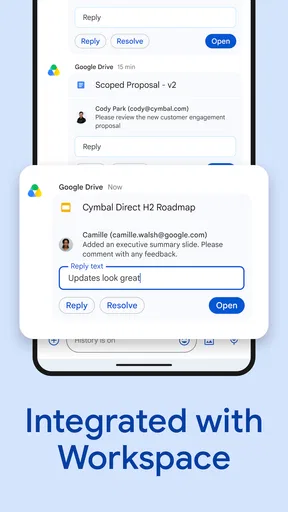
One of the coolest features is the integration with other Google services. You can easily access your Google Calendar, Drive, and more directly within the app. It’s like having your own personal assistant right in your pocket, helping you keep everything in one place.
Features That Stand Out
What really sets Google Chat apart are the chat rooms and direct message capabilities. You can create rooms for different projects or groups, making collaborations super smooth. Plus, the ability to thread conversations means you’ll never lose track of important discussions.
Let’s not forget about the smart suggestions. Google’s AI comes into play here, offering suggestions based on your conversation context. It’s like having a buddy who always knows what you’re thinking! And for those who love a bit of flair, the emoji reactions and the ability to tag people in conversations add a nice touch of fun.
Security and Privacy
In today’s world, security is a big deal, and Google Chat doesn’t slack in this department. With strong encryption and Google’s robust security infrastructure, you can chat away with peace of mind. The app also offers admin controls for businesses, making it a solid choice for team communications.
Final Thoughts
All in all, Google Chat is a powerhouse in the realm of communication apps. It’s not just about sending messages; it’s about creating a seamless workspace where you can collaborate and connect effortlessly. Whether you’re working on a team project or just catching up with friends, this app is a reliable companion.
So, if you’re looking for a way to declutter your digital communications and bring some sanity back to your life, give Google Chat a whirl. It might just become your new best friend.
Pros
- Seamless integration with other Google Workspace apps.
- Real-time collaboration and messaging.
- Customizable notifications for better focus.
- Cross-platform availability on Android and iOS.
- Supports file sharing directly in chats.
Cons
- Limited emoji and reaction options.
- Lacks advanced project management features.
- Voice and video call quality can vary.
- Requires a Google account to access.
- No offline messaging capability.
FAQs for Google Chat
What is Google Chat and how does it work?
Google Chat is a messaging platform designed for teams and businesses. It integrates with Google Workspace, allowing users to send direct messages and participate in group conversations. It supports threaded conversations, file sharing, and integrates with other Google apps like Drive and Calendar, enhancing collaboration and productivity.
Is Google Chat free to use?
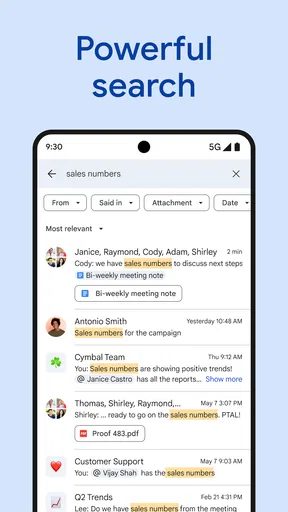
Google Chat is available for free with a personal Google account, but its full features are best experienced with a Google Workspace subscription. This subscription includes additional functionalities like advanced search, security controls, and integration with other productivity tools, making it ideal for business environments.
Can Google Chat be used on mobile devices?
Yes, Google Chat is available as a mobile app for both Android and iOS devices. The app provides all the features available on the desktop version, ensuring seamless communication on the go. Users can easily access messages, join meetings, and collaborate with their team from anywhere.
How secure is Google Chat?
Google Chat offers robust security features, including encryption of messages both in transit and at rest. It integrates with Google’s security infrastructure, providing users with tools like two-step verification and advanced administrative controls, making it a secure choice for businesses concerned about data protection.
Does Google Chat integrate with other applications?
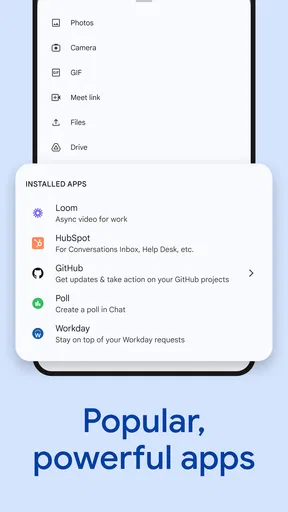
Yes, Google Chat integrates with various applications to streamline workflow. It works seamlessly with Google Workspace apps like Calendar, Drive, and Meet. Additionally, users can connect it with third-party apps such as Slack and Trello via APIs and bots, enhancing productivity and collaboration.


